-
I began to start work on this today and I am curious as to how I get all the wiring through that hole in the trunk. Do I have to remove the back seat to get to it?Leave a comment:
-
Sure, you could do it there, or (this is a tricky one) you can run 4 pairs of speaker wire into the backseat area. Find the rear speaker wires (remember black stripe is positive) and cut them. Connect the rear wires from the amp to them.
Now, connect the amps speaker wires to the set of wires that WAS the rear, then connect the rears to the fronts behind the deck.
Get it, basically, the wires are already in the car, you are just using them differently.
It is kinda cheesy, but works fine. If no one else works on it, no worries, right?
I say run all new wire (in your case, non-amplified car) to all 4 speakers. You can do it nicer, the colors and polarity are perfect, etc. It is just the right thing to do for your car.
3 sets of RCAs because you may eventually need front, rear and sub (wait, didn't you say you had a 5 channel?) since they are so cheap..I mean WTF, $4.50 a set? Do it.Leave a comment:
-
WOW! That is an awesome response! I do have a few questions though. Why do I need 3 pairs of RCA cables? I am a little confused by that number since I have never put a system in a car.
Also I am a little confused when you are talking about running the speaker wire to the right side speakers. You say
"Make your right side wires long enough to reach your speakers, too. Just run them above the glovebox. Pull the plastics up there if you wanna, generally you can get up there well enough to run them by the DME while still making sure to keep them out of the way, so you can work on stuff later."
Based on this statement I am guessing that you are telling me to run all new speaker wire directly from the amp to each speaker? I was just going to run all the speaker wire from the amp up the left side of the to behind the headunit and connect it to all the speakers there.
Sorry for all the questions I just want to make sure I do everything the right way.Leave a comment:
-
Your Kenwood puts out +12V on the solid blue wire whenever the deck is in "Tuner" mode.
ah...if you have the Premium, your trunk mounted amp would have wire for all 4 corners AND a seperate remote wire...but if not, just bite the bullet and run 4 speaker wires, 3 pair of RCAs and a remote wire up that left side.
I HIGHLY recommend the "Premium" RCAs from www.monoprice.com. You will want the 15', your amp can go on the back of your sub box, on the trunk wall or pretty much wherever you want it. Run all those cables right with the factory wires, all the way from the trunk gromett to the deck.
Once you have the deck out and the underdash panel out (pull that damn metal brace too) and the left kickpanel, you will see where the factory ran their wires. Do the same, but make sure you don't interfere with the heater controls, especially that vent on the left side of the dash.
Keep it tidy! 2 or 3 wire ties will keep them in place up front. Be certain your left kickpanel can go back on nicely. Too short a bundle up there can mean either cutting the kick panel or re-running your wire, both are a bummer.
Make your right side wires long enough to reach your speakers, too. Just run them above the glovebox. Pull the plastics up there if you wanna, generally you can get up there well enough to run them by the DME while still making sure to keep them out of the way, so you can work on stuff later.
If you are doing components, DON'T put the crossovers behind the speakers, put them in the dashboard. I put them in the trunk generally, but then you have to run more wire.
Your doors are pre-wired for tweeters, so get rid of those co-ax as soon as you can. Your ankles won't appreciate the highs near as well as your ears, and they are on opposite ends of your body, right?
Post some pics when you are done!
LukeLeave a comment:
-
-
good call. well here'es the thing and sorry to thread jack OP. I run a nonpowered z3 mast antenna and I've noticed I've got crappy reception. It is wired via the 3 bundled antenna wires: red (constant) white (switched hooked to back of the deck) and coax (back of deck). Since it is a stationary antenna, I only hooked the Coax and White to power and amplify the reception.
I suspect its because it is being powered by the white switched wired that only temporarily sends a 12v signal instead of a 12v constant with the red wire. That's my understanding. unless my kenwood unit just sucks when it comes to receiving radio receptionLast edited by bmwstephen; 03-02-2011, 10:05 AM.Leave a comment:
-
-
Luke are you referring to the white wire connected to most decks that functions as a 12v switch? If in tuner mode, does that wire run a constant 12v through the wire or does it simply send a current for a short time enough to get the antenna up and retract it when the unit shuts off.Leave a comment:
-
Mike, what car do you have and what level of stereo came with it?Leave a comment:
-
Alright I will run everything up the left side then! Am I okay leaving the stock BMW wiring to the speaker and just connecting the amp to the speakers behind the headunit? ThanksLeave a comment:
-
Do NOT run RCAs up the right side, your battery cable is there. No other wire in the car will cause noise...run them up the left side. In fact, run all of them up the left, including the speaker wires.
Run a remote wire too. Most decent decks have a dedicated power antenna control wire, so while in other modes the antenna will be down, only up for Tuner.
LukeLeave a comment:
-
Amp Wiring and Questions
Hello everyone. Looking for a little help installing my new system. I have a nice new headunit, a 5 channel Amp, and 4 Alpine SPR 13C speakers. I have the headunit installed and working properly and now I have a few questions before I install the rest of the stuff.
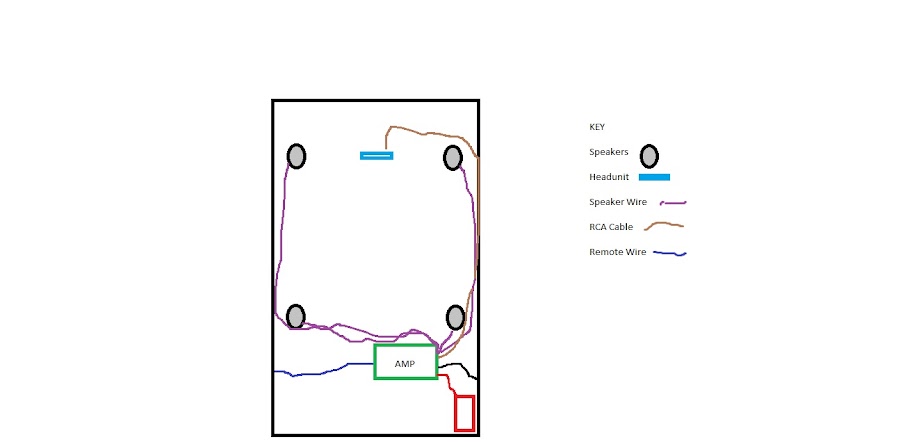
The first thing I want to do is make sure that I have the wiring all figured out. I am running the positive from the amp to the battery, the negative to a grounded point in the trunk, and the remote from the amp to the antenna. What is the most common point to ground an amp in the E30 trunk?
I am then going to run the RCA cables up the right side of the car and to the headunit. How hard is it to get the cables run behind the dash? Any tips?
After I get the RCA cables run my plan is to run all new speaker wire from the amp to each individual speaker. Is this the best way, or can I just connect to all the speakers behind the headunit. I have read mixed things on this and can't remember which is preferred? Would the stock wiring suffice?
I was also wondering where and how most people mount their amp in the trunk. I bought a 5 channel amp with the intention of getting a small sub someday, so I would prefer not to mount the amp where I would mount the sub.
Any help would be appreciated!
Mike


Leave a comment: