
No OS shouldnt matter as long as it supports 32gb+
Try doing the paired slots thing, put the two that end in 0521 and 0522 in 2 and 4, and the 0532 0531 in 1 and 3.
Could be your ram slots are dead but I doubt it, after doing the above try one ram stick in each slot and see if you run into an issue.
-
Two separate packages, but identical sticks.
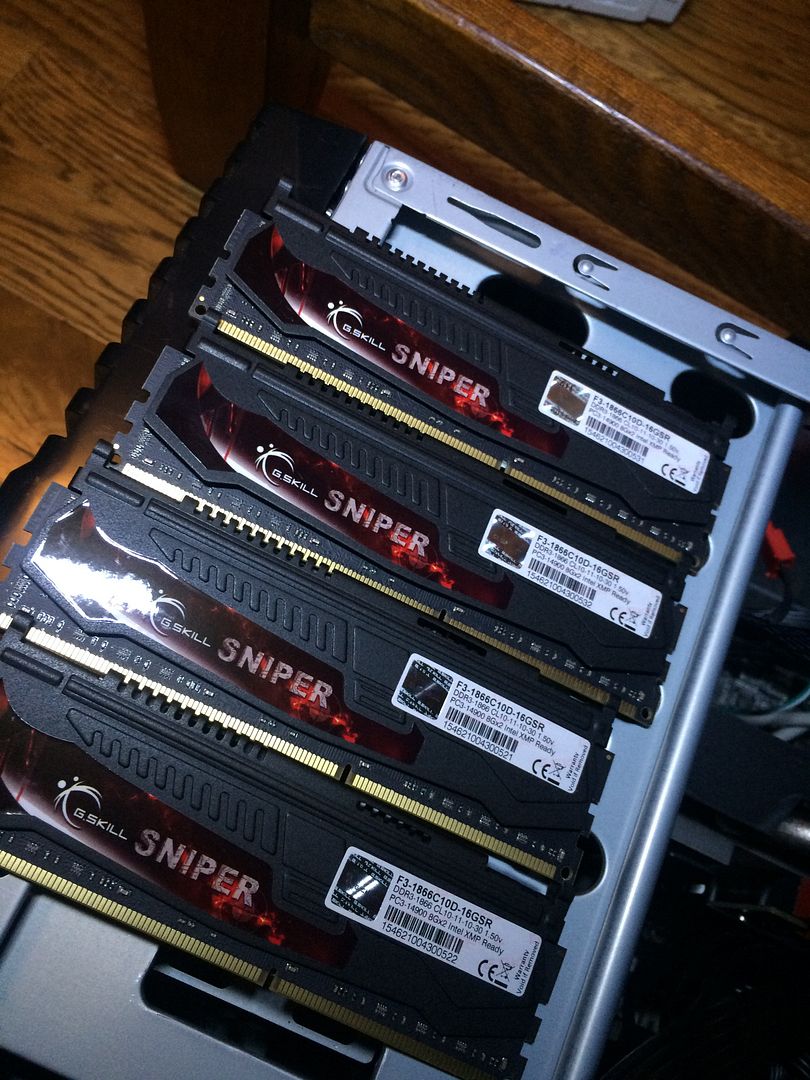
I have a feeling that my BIOS isn't in complete agreement with the ram, but it's still all a foreign language to me, not too sure what to change. I'm learning though!
The BIOS version is the most current, checked that already. Would the procurement method of this win 7 ultimate cause these problems?
Sent from my iPhone using TapatalkLeave a comment:
-
-
Gaming PC
Case: Antec Nine Hundred Two
Case fans: (x4) Cooler Master SickleFlow 120mm R4-L2R-20AG-R2
Motherboard: ASROCK Z77 Pro4
Processor: Intel i7-3770K @ 3.50 GHz
CPU Cooler: Cooler Master Hyper 212 EVO
RAM: Patriot (4x8gb) DDR3
Power Supply: Black Widow 850W
Graphics Card: 560TI Twin Frozr
Hard Drives: (x2) WD Black 1Tb RAID 0
System: 64 bit Windows 7 Pro
Screen: 39" LED Samsung
Laptop
Piece of S**T ToshibaLast edited by 88BlackS-ETA; 12-22-2015, 07:53 PM.Leave a comment:
-
-
-
Did they come in two separate packs or one big pack?
If you are getting 16gb it could be that you have configuration wrong. Sticks come in pairs usually from what I remember, which means they have to be in their respective DIMM slots.
So one pair in the 1 and 3 slot, another in the 2 and 4 slot.
The other thing It could be is your BIOS isnt updated to latest version.Leave a comment:
-
I figured out two of my fans are only 3 pin, so they run full bore from boot up! I'm thinking about buying a new silent style case with some noctua fans.
I tested all 4 of the 8gb sticks and they all boot up and are recognized, so I don't think any are bad, but once I put the 3rd (and 4th for that matter) stick in, the BIOS only recognizes 16gb, and windows shows whatever ram amount is plugged in, but says only 16gb is in use. Not sure why it's doing this.Leave a comment:
-
Ha, Im happy with my 4760K but I want more cores. Thats why I'm probably going to build a small xeon server. By small I mean dual 6 or 8 core monster with like 64GB ECC ram.
Could probably host a handful of Source engine servers on it and a TS3.Leave a comment:
-
Funny story how I ended up with mine. Had a decent asus motherboard that I wanted to use, so I figured I would stay AMD. Got the best damn AMD chip I could find, just to find out my current board would fry itself trying to power the thing.
So since newegg doesn't accept returns on chips I went ahead and bought the sabertooth 990fx. The system does well, coupled with the 970gtx it runs everything I throw at it on max settings without breaking a sweat.
Had I known I would end up with a new combo I would have gone Intel. Still happy with it though. Intel like a f1 car, while AMD is like a dump truck. One moves fast, the other moves alot. At least that's the best way I've heard it described. I like your analogy as well.
Now I just need to toss another 970 in there and be done for 5 years.Leave a comment:
-
AMD and Intel always remind me of soviets vs. US from red alert
AMD throws tons of cheap conscripts at an objective to get the job done
Intel is like the US uses a few special OPs and trained soldiers to get the same job doneLeave a comment:
-
Not heat, performance haha. I feel like AMD sometimes embraces the "AMD chips run hot and are inefficient" mantra too much.Leave a comment:
-
My h100i does pretty well with it. I forget the temps but I'll check next time I'm on it.Leave a comment:


Leave a comment: