

When I'm on the main forum listing screen (web site, not Tapatalk) the topic listed in the Last Activity column of the E30 DIY forum is named "Brake Light Issue Fix," with user Rev Run D listed. When I click on the thread title, I get this error message.
Sorry, you are not authorized to view this page.
Please try logging in or logging in as different user Login or send a message to the admin
When I click through to the E30 DIY forum, that topic isn't even listed. Is anyone else having a problem like this?
Thanks, Cory
-
I just experienced the same log in issue.
I'm also dealing an "unapproved" thread I just started, how do I go about having it re-approved? I'm guessing editing it is what caused the thread to be flagged...
Leave a comment:
-
Glad to be apart of this community. Looking to give and receive any information possible.Leave a comment:
-
When on the main page, if I click the "Latest Activity" tab, it eventually just gives an error that says
"error
unable_to_contact_server_please_try_again
error_information_x"
I've also been logged out 5 times today and logging back in seems to be hit or miss. It gives a dropdown box in the top right that shows a mini version of the main page with me logged in but says "That action could not be completed. Please try again, and if this occurs again please contact the system administrator and tell them how you got this message."Leave a comment:
-
Anyone else having issues with Tapatalk? I can't get certain big threads to load (ahem**Nonsense Thread**ahem) as it just times out querying the db and produces an error.Leave a comment:
-
-
-
I cant find the option to subscribe to thread, to receive email notifications. Can someone clarify?Leave a comment:
-
I am working on two of my tutorials, and when adding the Youtube videos, my own post thread has become "unapproved", meaning only I can see it, but other users can not.
Nando (mod)fixed the last, but this is the latest:
'90 325i S52 to S54 '06 Z4M w/ ZF 6 Speed
EDIT, most likely this is related to vBulletin's Akismet anti-spam toolLast edited by R3Z3N; 08-12-2019, 08:30 PM.Leave a comment:
-
Can we get the breadcrumbs at the bottom or get the back to forum button back? Currently it's clicking go to top, then using the bread crumb to go back to general discussion, for example.Leave a comment:
-
Yes - just go into your setting and uncheck all the options you dont want for notifications. I had them all off before but had to go in and turn them off againgreat work on the update. In regards to notifications I have the same problem. waaaay too many notifications, as in hundreds.
The only two things I had checked didn't have anything to do with the notifications I was getting, and even after unchecking everything, I'm still getting notifications.Leave a comment:
-
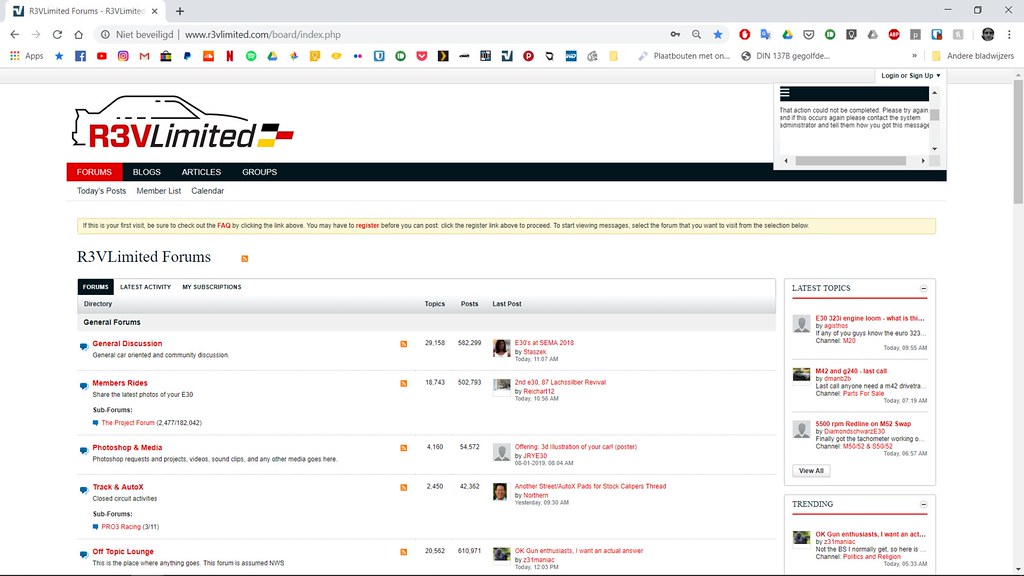
I'm having troubles with logging in.. There opens a small window, and I'm not logged in, when I then click on the general sub forum, I'm suddenly logged in.
Also, the website doesn't remember be when I close chrome and open the forum again
Leave a comment:
-
I think the setting is only for your user profile, it does not change the font size when browsing the forum.
As of now there does not appear to be a way to change the font size of the forum.
I also am not receiving any email notifications. This had broken on the old site a week or two before the upgrade as well.Leave a comment:
-
A few things I've noticed...
no longer able to find the selection for "threads started by a specific user"
no longer receiving email notifications, and I made sure to confirm they were on
not nearly as easy to navigate as the old site (yes, I'm sure there will be a learning curve, but still)
site seems much slower than before (I'm sure it'll take some time)
on the mobile site, the first sentence I write when replying to a post, the first letter of the sentence defaults to lower case (bf.c does the same thing, and like there, it isn't every time)
and yes, the all white hurts my eyes, lol
edit:
would also be nice to see forum handle of the person who last replied to a thread, next to the "last post made at x time"
also, nobody has their location, on the column next to their post anymore
Last edited by e30austin; 08-13-2019, 07:19 AM.Leave a comment:


Leave a comment: